
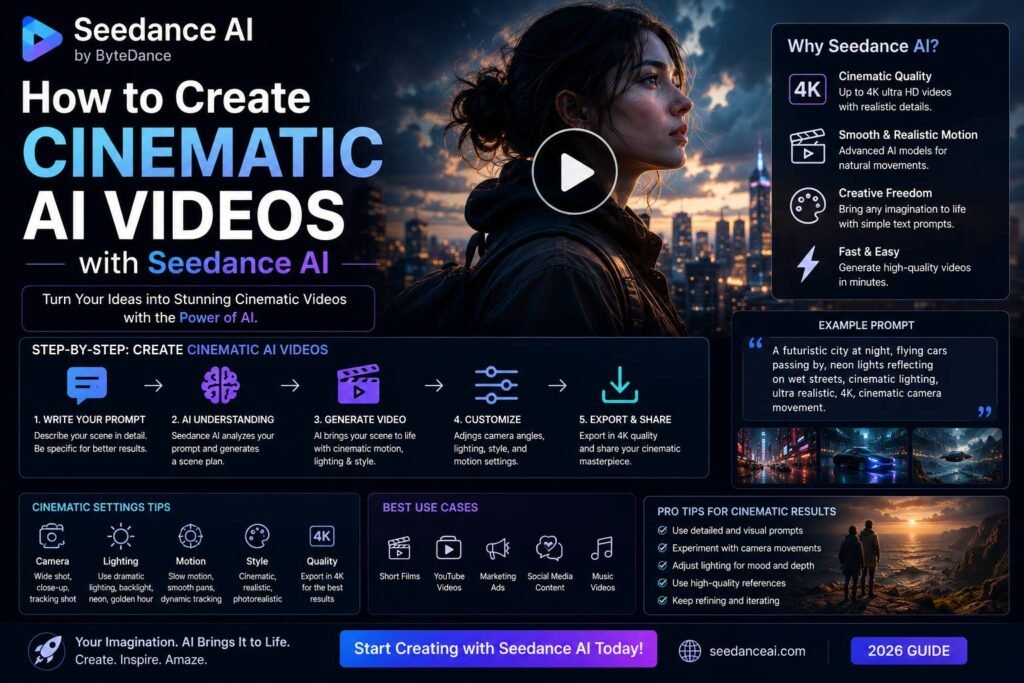

What Is Seedance AI and Why It Matters for Video Creators
The landscape of AI-generated video has shifted dramatically in the past year, and Seedance AI sits at the forefront of that change. Developed to bridge the gap between amateur content creation and professional-grade cinematography, Seedance AI gives creators the tools to produce visually stunning, motion-rich videos from simple text prompts or reference images. Whether you are a filmmaker, marketer, social media creator, or hobbyist, understanding how to create cinematic AI videos with Seedance AI opens up a world of storytelling possibilities that were previously reserved for studios with large budgets.
What sets Seedance apart from many competitors is its emphasis on temporal consistency, smooth camera motion, and photorealistic rendering. The model handles complex motion sequences — from sweeping aerial shots to intimate close-ups — with a level of coherence that earlier AI video tools struggled to maintain.
Setting Up Your Seedance AI Workflow
Before diving into production, you need to establish a reliable workflow. Seedance AI is accessible through ByteDance’s platform and various API integrations, so your first step is creating an account and familiarizing yourself with the interface.
Understanding the Core Input Methods
Seedance AI supports three primary input methods:
- Text-to-video: Describe your scene in natural language and let the model interpret your creative vision.
- Image-to-video: Upload a still image and animate it with motion directives.
- Video-to-video: Use an existing video clip as a reference to apply new styles or enhance motion.
For cinematic results, image-to-video tends to yield the most controlled output, especially when your reference image already has strong compositional qualities — dramatic lighting, clear subject framing, and a defined depth of field.
Crafting Prompts That Produce Cinematic Results
The quality of your output is directly tied to the quality of your prompt. Learning how to create cinematic AI videos with Seedance AI is largely a skill of precise, evocative language. Vague prompts produce generic results; specific, layered prompts unlock the model’s full potential.
Structure Your Prompts Effectively
A strong cinematic prompt typically includes:
- Subject description — Who or what is the focal point of the scene?
- Environment and atmosphere — Where is the action taking place, and what is the mood?
- Camera movement — Specify movements like slow dolly-in, pan left, aerial descent, or handheld tracking shot.
- Lighting conditions — Golden hour, overcast diffused light, neon-lit urban environment, candlelight.
- Visual style — Film grain, anamorphic lens flare, shallow depth of field, high contrast.
Example prompt: “A lone astronaut walking across a red Martian desert at dusk, slow cinematic dolly push-in, dramatic side lighting casting long shadows, dust particles floating in the air, shallow depth of field, 35mm film grain, epic orchestral mood.”
This level of detail gives Seedance AI the contextual richness it needs to render a coherent, emotionally resonant clip.
Controlling Camera Motion for a Professional Look
One of Seedance AI’s most impressive capabilities is its nuanced handling of camera movement. Unlike static AI-generated clips, cinematic video relies heavily on purposeful motion to guide the viewer’s eye and build emotional tension.
Camera Movement Vocabulary to Use
- Dolly shot: Smooth forward or backward movement that builds intimacy or reveals scale.
- Pan and tilt: Horizontal or vertical sweeps that reveal environments or follow action.
- Crane/aerial shot: Rising or descending perspectives that establish grandeur.
- Handheld: Subtle shake that adds realism and urgency.
- Rack focus: Shifting focus between foreground and background subjects.
Explicitly naming these techniques in your prompt dramatically improves the likelihood that Seedance AI will replicate them accurately. Pairing camera movement descriptions with subject motion — for example, a character walking while the camera tracks alongside — creates layered, dynamic compositions.
Enhancing Visual Quality Through Iteration
Even with a well-crafted prompt, your first generation may not be perfect. Cinematic AI video creation is an iterative process, and Seedance AI rewards users who refine and experiment.
Tips for Iterative Improvement
- Adjust seed values to explore variations without completely rewriting your prompt.
- Modify one variable at a time — change the lighting description before altering camera movement, so you can isolate what is driving visual changes.
- Use negative prompting where available to exclude unwanted elements such as blurry motion, distorted faces, or over-saturated colors.
- Upscale and enhance your best outputs using AI upscaling tools before final delivery.
Keeping a prompt journal is highly recommended. Document what worked, what did not, and what small tweaks produced significant improvements. Over time, you will develop an intuitive sense for the model’s strengths.
Editing and Post-Processing for a Polished Final Cut
Raw Seedance AI outputs are impressive, but professional-grade cinematic videos typically require post-processing to reach their full potential.
Recommended Post-Production Steps
- Color grading: Apply LUTs in DaVinci Resolve or Adobe Premiere to achieve a consistent cinematic palette. Teal-and-orange grades, bleach bypass, or desaturated moody tones all work well.
- Sound design: Add ambient audio, foley effects, and music to transform a silent clip into an emotionally engaging experience.
- Compositing: Layer multiple AI-generated clips together with smooth transitions to build longer narrative sequences.
- Stabilization: If any clips appear slightly jittery, run them through stabilization software to smooth out unwanted motion.
Practical Applications for Cinematic AI Video
Understanding how to create cinematic AI videos with Seedance AI is not just a technical exercise — it is a creative strategy. Filmmakers use it for concept visualization and pre-production pitching. Marketers deploy it for high-impact brand campaigns without location shoots. Musicians use it for music video production on independent budgets. Educators and journalists use it to visualize historical events or abstract concepts.
The democratization of cinematic production is real, and Seedance AI is one of the most capable engines driving it forward. With deliberate prompting, thoughtful iteration, and smart post-production, anyone can produce video content that genuinely rivals traditionally filmed material.
READ MORE:
- Seedance AI: The Complete Guide to ByteDance’s AI Video Generator (2026)
- ZenMux AI: The Complete Guide to the Unified AI Gateway for Developers (2026)
- The AI Entrepreneur Everyone Is Talking About: Suraj Biswas’s Success Story
Published By Branding.net.in