
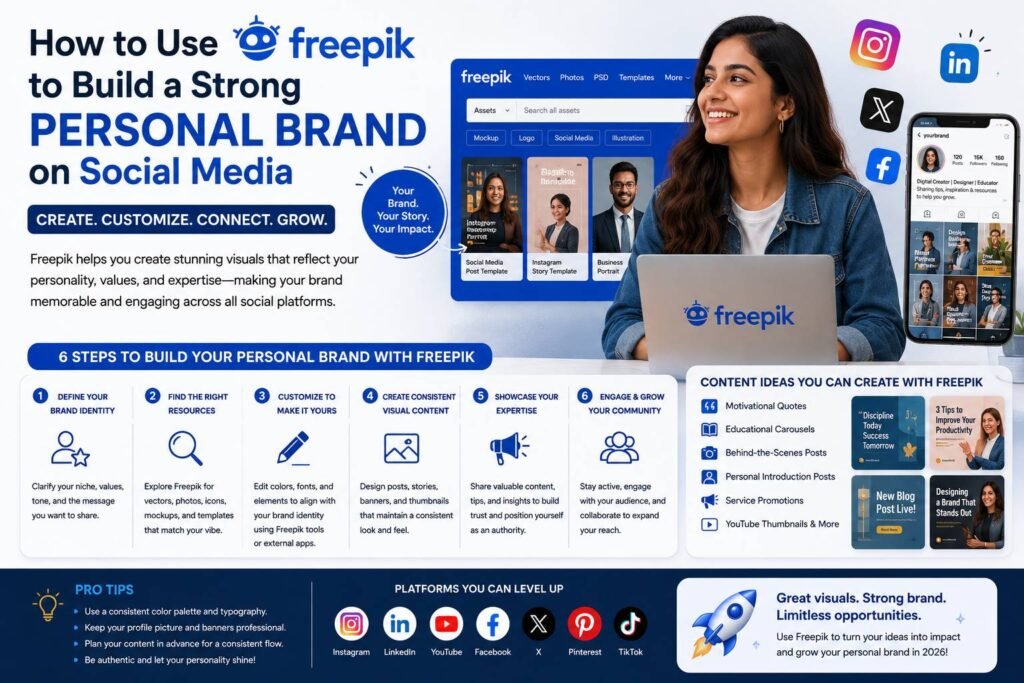

Why Visual Consistency Is the Foundation of Personal Branding
Building a personal brand on social media is no longer optional for professionals, entrepreneurs, and creatives who want to stand out. Your visual identity — the colors, typography, imagery, and design style you consistently use — communicates who you are before a single word is read. The challenge for most people is that professional-grade design has traditionally required either expensive software or a skilled designer. That’s where Freepik changes the equation entirely.
Freepik is one of the largest repositories of high-quality graphic resources on the internet, offering millions of vectors, illustrations, photos, templates, and mockups. When used strategically, it becomes a powerful engine for building a cohesive, recognizable visual presence across every social media platform you inhabit.
Getting Started: Define Your Brand Identity First
Before opening Freepik, spend time clarifying what your personal brand actually stands for. Ask yourself:
- What industry or niche do I represent?
- What three to five words describe my personality and professional style?
- Who is my target audience, and what visual language resonates with them?
- What color palette and typography feel authentic to my message?
This groundwork matters because Freepik gives you access to an enormous library. Without a clear direction, it’s easy to download assets that look beautiful in isolation but create a disjointed, inconsistent feed. Knowing your brand identity lets you filter the library with intention.
Exploring Freepik’s Resource Types for Social Media
Once you have a clear brand direction, you can begin exploring the platform’s categories with purpose. Here’s how each resource type serves your social media presence:
Templates
Freepik offers pre-designed social media templates for Instagram posts, LinkedIn banners, Facebook covers, Pinterest graphics, and more. These templates are professionally structured, meaning the hierarchy, spacing, and visual balance are already optimized. You can customize them using tools like Adobe Illustrator, Canva (via downloaded files), or Freepik’s own built-in editor.
Vector Illustrations and Icons
Vectors are infinitely scalable without losing quality, making them ideal for profile graphics, story highlights, and branded content overlays. Choosing a consistent illustration style — flat design, line art, isometric — and sticking to it across your posts creates a signature aesthetic that followers begin to associate with your name.
Stock Photography
High-quality stock photos from Freepik can supplement your original content, particularly for background images, mood boards, and blog-style posts. Applying a consistent filter or color grade to these images in editing software keeps them aligned with your brand palette.
Mockups
If you sell products, offer digital services, or want to showcase your work professionally, mockups are invaluable. Freepik’s mockup library lets you display ebooks, course covers, merchandise, or app designs in realistic, polished settings that elevate your credibility instantly.
Building a Consistent Visual System with Freepik Assets
The secret to using Freepik to build a strong personal brand on social media lies not in downloading the most eye-catching assets, but in building a repeatable visual system. Here’s a practical approach:
- Choose a color palette and stick to it. When browsing Freepik, filter by color to find assets that match your chosen palette. Many vectors and illustrations allow you to edit colors directly, so you can adapt almost any asset to your brand scheme.
- Select one or two typefaces. Consistency in typography signals professionalism. If a Freepik template uses fonts you don’t own, replace them with your chosen typefaces before publishing.
- Create a set of branded templates. Download two or three base templates for your most frequently published content types — a quote graphic, a tip carousel, an announcement post — and customize them to reflect your brand. Reuse these templates repeatedly, swapping out content while keeping the visual structure identical.
- Maintain a personal asset library. Save your downloaded and customized Freepik assets in an organized folder structure. This speeds up content creation and ensures you’re always pulling from a curated, on-brand collection.
Practical Use Cases Across Social Platforms
Instagram and TikTok
These platforms are visually driven and reward aesthetic consistency. Use Freepik’s illustration packs and photo backgrounds to create a cohesive feed grid. Design story highlight covers using matching icon sets from the platform. For TikTok, Freepik’s motion-friendly assets and background vectors can enhance video thumbnails and on-screen text overlays.
LinkedIn rewards professionalism. Use Freepik’s business-oriented templates for banner images, infographic-style posts, and document carousels. A polished LinkedIn profile banner made from a customized Freepik template immediately signals credibility to recruiters and potential clients.
Pinterest is essentially a visual search engine. Freepik templates designed for Pinterest’s vertical format can help you create pins that drive traffic back to your website or portfolio while maintaining strong brand recognition.
Navigating Licensing and Attribution
Understanding Freepik’s licensing is essential to using it ethically and professionally. Free-tier users can access a significant portion of the library but are typically required to attribute the original creator when publishing assets. Premium subscribers gain access to a broader library with fewer attribution requirements.
For personal branding purposes, a premium subscription is often worth the investment. Removing attribution requirements gives your content a cleaner, more professional appearance, and the expanded library provides far more options tailored to your niche.
Always review the specific license terms for each asset before using it in commercial contexts, particularly if you’re promoting paid products or services.
Turning Assets into a Recognizable Brand Over Time
The most powerful outcome of learning how to use Freepik to build a strong personal brand on social media is the compounding effect of consistency. Each post that shares your color palette, your illustration style, and your typographic choices reinforces your identity in the minds of your audience. Over weeks and months, followers begin to recognize your content instantly — even before reading your name.
Freepik doesn’t replace your unique voice or perspective. It amplifies it. By removing the technical barriers to professional design, it frees you to focus on the content itself while presenting it in a way that commands attention and builds lasting trust.
READ MORE:
- What Is Freepik? A Complete Guide for Designers and Content Creators in 2026
- How to Create a Behance Portfolio That Gets Noticed by Recruiters and Clients
- How to Build a Powerful Personal Brand on LinkedIn in 2026
Published by Branding.in.net