
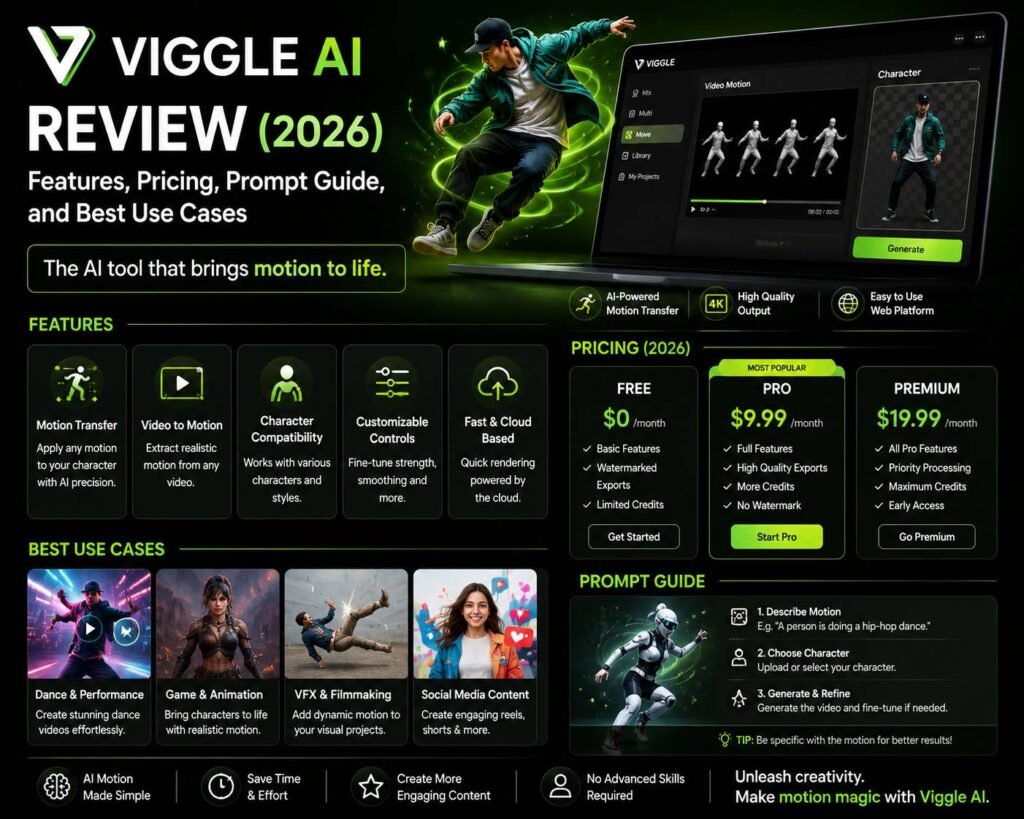

What Is Viggle AI and Why Is It Generating Buzz in 2026?
Viggle AI has quickly become one of the most talked-about tools in the AI video generation space. Originally launched as a platform focused on character animation, it has evolved into a robust creative suite that lets users animate images, generate motion-driven video clips, and blend characters into custom backgrounds — all without professional video editing experience.
If you’ve been searching for an honest Viggle AI review covering 2026 features, pricing, prompt strategies, and best use cases, this article breaks it all down in practical terms. Whether you’re a content creator, marketer, game developer, or social media enthusiast, understanding what Viggle AI can and can’t do will help you decide if it belongs in your creative workflow.
Core Features of Viggle AI in 2026
Viggle AI’s feature set has expanded significantly, and the platform now supports a wider range of animation and video generation tasks than in its earlier iterations. Here’s what stands out:
Character Animation from Static Images
The flagship capability remains character animation. Users can upload a still image of a person or character and apply motion templates — ranging from walking and dancing to custom poses — to bring them to life. The physics-based animation engine produces surprisingly natural movement, especially for humanoid figures.
Background and Scene Integration
One of the more impressive upgrades in 2026 is the improved scene blending. Users can now place animated characters into custom backgrounds with better lighting consistency and edge detection. This makes it easier to create short narrative clips, promotional videos, or social content without needing a green screen setup.
Text-to-Animation Prompts
Viggle AI supports text-driven motion prompts, allowing users to describe an action in plain language and have the system interpret it into movement. This feature is particularly useful for creators who don’t want to scroll through pre-built motion libraries.
Video-to-Video Motion Transfer
This feature lets users apply the motion from one video clip onto a different character or image. It’s a powerful tool for content remixing and is widely used in entertainment, fashion, and digital marketing.
Multi-Character Support
The 2026 version supports multiple characters in a single scene, which was a significant limitation in earlier releases. This opens the door for short storytelling clips, duo dances, and branded content featuring several figures at once.
Viggle AI Pricing: What You’ll Pay in 2026
Viggle AI operates on a freemium model with tiered subscription plans. Here’s a general breakdown:
- Free Plan: Limited daily generations, watermarked outputs, access to basic motion templates
- Standard Plan (~$12–$16/month): Increased generation credits, watermark removal, access to HD exports
- Pro Plan (~$30–$40/month): Priority processing, advanced motion controls, multi-character scenes, commercial use licensing
- Enterprise Plan: Custom pricing for teams, API access, dedicated support, and white-label options
Pricing is competitive within the AI video generation market, especially considering that comparable tools often charge significantly more for similar output quality. However, the free tier is fairly restrictive, so serious creators will likely need at least the Standard plan to get meaningful value.
Credit-based systems mean heavy users should monitor consumption carefully, as complex animations with multiple characters or extended clip lengths consume more credits per generation.
Prompt Guide: Getting the Best Results from Viggle AI
Crafting effective prompts is one of the most underrated skills when using Viggle AI. Here’s a practical guide to help you get better outputs:
Be Specific About the Motion
Vague prompts produce inconsistent results. Instead of writing “make her dance,” try something like “character performs a slow hip-hop groove with arms raised and head bobbing.” The more detail you provide about rhythm, limb movement, and energy level, the closer the output will match your vision.
Reference a Style or Genre
Viggle AI responds well to stylistic cues. Adding references like “ballet-inspired movement,” “zombie shuffle,” or “martial arts kata” helps the system interpret your intent more accurately.
Describe the Environment Context
When using background integration, include context in your prompt. Phrases like “outdoor festival crowd in daylight” or “neon-lit urban alley at night” help the system match lighting and atmosphere to your character animation.
Use Short, Layered Prompts
Rather than writing one long, complex prompt, consider breaking your creative direction into layers — motion first, then environment, then mood or style. This approach often yields cleaner, more controllable results.
Iterate Quickly
Don’t expect perfection on the first generation. Viggle AI’s credit system and generation speed make rapid iteration practical. Run three to five variations with slightly different prompts and select the strongest result.
Best Use Cases for Viggle AI
Understanding where Viggle AI truly shines helps you deploy it strategically rather than experimentally.
Social Media Content Creation
Short animated clips perform exceptionally well on platforms like TikTok, Instagram Reels, and YouTube Shorts. Viggle AI makes it easy to produce eye-catching character animations without a production team.
Brand and Marketing Campaigns
Marketers are using Viggle AI to animate brand mascots, create product-adjacent lifestyle content, and produce dynamic ad creatives at a fraction of traditional production costs.
Game Development and Concept Art
Indie game developers use the platform to prototype character animations, test movement styles, and visualize NPCs before committing to full animation pipelines.
Music Video Production
Artists and producers are leveraging Viggle AI to create stylized visuals for tracks, particularly for independent releases where budget constraints make traditional video production impractical.
Education and E-Learning
Animated characters can make instructional content more engaging. Educators and course creators are beginning to use Viggle AI to bring presenters and explainer characters to life in a cost-effective way.
Final Verdict
Viggle AI in 2026 is a genuinely capable tool that has matured well beyond its early novelty phase. Its combination of accessible pricing, improving output quality, and expanding feature set makes it a legitimate option for creators across industries. While it still has limitations — particularly around fine-grained control and photorealistic rendering — the platform delivers strong value for the price. For anyone exploring AI-powered animation and video generation, it deserves a serious look.
READ MORE:
- Amazon Prime Day Sale 2026 India: Best Deals, Dates, Bank Offers & Shopping Tips
- Gemini AI vs Claude AI: Which AI Model Should You Choose?
- Gemini AI vs ChatGPT: Which AI Assistant Is Better in 2026?
Published By Branding.net.in